
5.2 字串
字串是字元的陣列
字串可以被視為一個字元型別的一維陣列,例如:"Hello world!"在記憶體中是這樣一個一個字元儲存的。
#include <iostream>

using namespace std;

int main()
{
    char greeting[13] = "Hello world!";

    cout << greeting;

    return 0;
}

在上圖中最後一個字元 '\0'是什麼呢?這個是所謂的 null字元。
因為每個字串的長度是不一定的,cout << greeting; 中,傳給 cout 的其實只是整個字串開頭在記憶體中的位址,cout 會逐個字元輸出,直到遇到 null 字元為止。
所以雖然 "Hello world!" 只有 12 個字元長,但是我們準備了長度為 13 的 char 型別陣列來儲存它。
如果我們把程式改成這樣。
#include <iostream>

using namespace std;

int main()
{
    char greeting[13] = "Hello world!";

    cout << greeting;  // 輸出: "Hello world!"

    cin >> greeting;  // 輸入: "Good"

    cout << greeting;  // 輸出: "Good"

    return 0;
}
在第 11 行輸入 "Good" 之後,greeting 陣列的內容會變成這樣。

輸入的字串被存放在 greeting 裡,而且最後被加上一個 null 字元。
如果我們在第 11 行輸入的是 "This_is_a_test_for_a_very_long_string.",想想看會發生什麼事情?
我們輸入的字串會覆蓋掉原來在 greeting 陣列後面的一大堆值。(加底線 _ 是因為 cin 預設讀取到空白或換行字元就會停。)
我們更常用的是 C++ 的 string 型別
如前所述,在不知道別人會輸入多長的資料下,要準備多長的字元陣列才夠?這對系統安全來說是個很重要的問題。
以前在 C 語言裡,我們要想辦法來處理這個問題,而在 C++ 裡現在有一個很方便的字串型別 string 可用。你可以很安全的這樣使用它。(按規矩,需要先 #include <string>,才能使用 string。但有的編譯器只要你 #include <iostream> ,就會include string,所以不寫也有可能會過,但寫了一定不會錯)
#include <iostream>
#include <string>

using namespace std;

int main()
{
    string greeting = "Hello world!";

    cout << greeting;  // 輸出: "Hello world!"

    cin >> greeting;  // 輸入: "This_is_a_test_for_a_very_long_string."
                      // 很安全,不會覆蓋到其他資料
    cout << greeting;  // 輸出: "This_is_a_test_for_a_very_long_string."

    return 0;
}
string 不是 int, float, double, char ...這種原生資料型別(Primitive Data Types)。他是用 C++ 寫出的一個類別(class),所以擁有比原生資料型別更多的能力。
取得 string 字串長度
使用 string 的 length() 方法(method),可以取得 string 內儲存字串的長度。
    string str;

    str = "abc";
    cout << str.length() << endl;  // 3

    cin >> str;  // 輸入 Memory
    cout << str.length() << endl;  // 6
練習:Reverse output - 反向輸出字串
讀取一個不含空白字元的字串,反向輸出它。
範例輸入:
Hello
範例輸出:
olleH
要反向輸出字串,我們需要知道該宇串的長度,才能使用索引值,將它一個一個字元反向輸出。
#include <iostream>
#include <string>

using namespace std;

int main()
{
    string str;

    cin >> str;

    for(int i=str.length()-1; i>=0; i--)  // 最後一個字元的索引是 str.length()-1
    {
        cout << str[i];
    }
    cout << endl;

    return 0;
}
練習:Reverse a string - 反向一個字串
讀取一個不含空白字元的字串,真的將其內容反向 後再輸出。
範例輸入:
Hello
範例輸出:
olleH
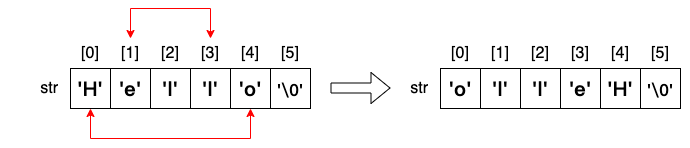
#include <iostream>

using namespace std;

int main()
{
    string str;

    cin >> str;

    cout << "Before reverse: [" << str << "]" << endl;

    int len = str.length();  // length of str
    for(int i=0; i<len/2; i++)
    {
        char ch = str[i];
        str[i] = str[len-i-1];
        str[len-i-1] = ch;
    }

    cout << "After reverse:  [" << str << "]" << endl;

    return 0;
}
組成字串的字元,在記憶體裡也就是數字而已
組成字串的字元,在記憶體裡也就是數字而已,操作這些數字可以做出一些很有意思的事情。
上網查一下 ASCII,看看每個英文字元對應的編碼數值為何。 https://zh.wikipedia.org/zh-tw/ASCII
仔細觀察一下,大寫字母的字碼加上 32 就是小寫字母的字碼。
| A | B | C | D | E | F | ... | W | X | Y | Z |
|---|---|---|---|---|---|---|---|---|---|---|
| 65 | 66 | 67 | 68 | 69 | 70 | ... | 87 | 88 | 89 | 90 |
| a | b | c | d | e | f | ... | w | x | y | z |
|---|---|---|---|---|---|---|---|---|---|---|
| 97 | 98 | 99 | 100 | 101 | 102 | ... | 119 | 120 | 121 | 122 |
大小寫轉換
練習:to lower - 把英文單字轉換成全部小寫
讀取一個不含空白字元的字串,將其中的大寫字母都改成小寫。
範例輸入:
YouTube
範例輸出:
youtube
#include <iostream>

using namespace std;

int main()
{
    string str;

    cin >> str;

    cout << "Before: [" << str << "]" << endl;

    int len = str.length();  // length of str
    for(int i=0; i<len; i++)
    {
        if(str[i]>='A' && str[i]<='Z') // 這樣比大小是可以的,因為每個字元都是數字
        {
            str[i] = str[i]+32;
        }
    }

    cout << "After:  [" << str << "]" << endl;

    return 0;
}
大家可以自己試試看
- 全部轉大寫
- 大寫小寫互換
char <--> int
既然字串裡的字元,其實都是以數值方式儲存在記憶體中。如果我們想把字串 "abcdefg" 的字碼像這樣依序列出。
是不是這樣就可以了?
    string str = "abcdefg";

    for(int i=0; i<str.length(); i++)
    {
        cout << str[i] << " ";
    }
    cout << endl;
不行!我們得到這個。
因為 cin 判別 str[i] 是一個字元(char),所以會把它以字元方式輸出。
必須讓 cin 把它視為 int 才能順利輸出數值。
我們可以使用 int( ) 強制將 char 轉型為 int。
    string str = "abcdefg";

    for(int i=0; i<str.length(); i++)
    {
        cout << int(str[i]) << " ";  // 強制轉型為 int
    }
    cout << endl;
這樣就沒問題了。
反過來也可以用 char( ) 把 int 強制轉型為 char。要注意的是 char 的大小為 1 Byte,所以只能接受 0~255。
    int data[7] = {97, 98, 99, 100, 101, 102, 103};

    for(int i=0; i<7; i++)
    {
        cout << char(data[i]);  // 強制轉型為 char
    }
    cout << endl;
輸出結果如下:
讀取一整行
在之前的例子中,我們無法輸入 "This is a test." 這樣的句子。因為 cin 在讀取 "This" 之後遇到空白字元,就中斷讀取。也就是一次只能讀進一個單字。
我們試一下這個程式
#include <iostream>

using namespace std;

int main()
{
    string line;
    int i = 1;

    while(cin >> line)
    {
        cout << i << ": " << line << endl;
        i++;
    }

    return 0;
}
輸入以下兩行字串
我們得到的輸出會是
使用 getline 讀取一行
使用 getline() 函數可以讀入一整行的字串,也就是讀到換行為止。
#include <iostream>

using namespace std;

int main()
{
    string line;
    int i = 1;

    while(getline(cin, line))
    {
        cout << i << ": " << line << endl;
        i++;
    }

    return 0;
}
同樣的輸入,這次的輸出為
cin 和 getline 搭配使用會遇到的問題
如果題目的輸入是這樣,第一行是 3 表示接下來有 3 行字串。
使用以下的程式讀取後,依序輸出各行字串。
#include <iostream>

using namespace std;

int main()
{
    string line;

    int n;
    cin >> n;

    for(int i=0; i<n; i++)
    {
        getline(cin, line);
        cout << line << endl;
    }

    return 0;
}
我們預期的輸出是
實際得到的是
前面多一行空白行,後面少一行 "Good morning"
原因如下:
- 我們的輸入包含按下的[Enter]是長這個樣子
3\nHello, world.\nThis is a test.\nGood morning\n
- 第 10 行的 cin >> n; 會把 3 讀進 n,於是剩下
\nHello, world.\nThis is a test.\nGood morning\n
- 接下來第 14 行的 getline(cin, line); 會把一行字串讀入 line 中,但是因為一開始就遇到換行,於是 line 裡面是個空字串 ""。但迴圈已繞了一圈,現在剩下的是
Hello, world.\nThis is a test.\nGood morning\n
- 所以接下來第二圈的 getline 讀完一行後,剩下
This is a test.\nGood morning\n
- 最後一圈的 getline 讀完一行後,還剩下
Good morning\n 沒被讀取,也沒被印出。
解決的方式是,用 cin 讀完 3 這個整數後,想辦法把後面的換行字元 '\n' 也先讀取掉。
#include <iostream>

using namespace std;

int main()
{
    string line;

    int n;
    cin >> n >> ws;  // 注意這裡的 ws

    for(int i=0; i<n; i++)
    {
        getline(cin, line);
        cout << line << endl;
    }

    return 0;
}
請注意,在這裡的 ws 指的是 white space,意思就是把 空白/換行/tab 這些「空白」字元都先讀光光。