# 05-陣列
# 5.1 一維陣列
## 陣列(Array)的結構
陣列這種資料結構是用來儲存許多相同型別的資料用的。如果我們把變數想像成是一個可以放東西的箱子,那麼陣列就是一堆箱子的集合,而且每個箱子都有一個連續編號的索引值(index)。
例如:我們要儲存 10 個學生的成績(都是整數),我們可以使用這樣一個內含 10 個元素(element)/項目(item)的陣列。
## 宣告陣列
在程式中我們可以這樣宣告這個陣列 score。
```C++
int score[10];
```
其語法為
型別 陣列名稱[元素數量];
其中陣列名稱的命名規則與一般變數的命名規則相同。
要特別注意的是,陣列的索引值是由 0 開紿,所以宣告大小為 10 的陣列 score。可以使用的元素是 `score[0]`~`score[9]`。
### 給定初值
如同變數可以在宣告同時給定初值,陣列也可以。
如果只宣告,但不給定初值,則陣列內各元素的值會無法預測(會是分配到的記憶體當下的值)。
```c++
int a[5] = {1, 3, 5, 7, 9};
for(int i=0; i<5; i++)
{
cout << a[i] << " ";
}
```
1 3 5 7 9
#### 初值不給足
如果陣列有 5 個元素,但是初值只給 2 個,剩下 3 個的值會是什麼?
```c++
int a[5] = {1, 3};
for(int i=0; i<5; i++)
{
cout << a[i] << " ";
}
```
1 3 0 0 0
觀察執行結果,可以發現它們被設為 0。
所以對於整數陣列,我們常用這樣的技巧來宣告並指定其初值皆為 0。
```c++
int a[5] = {0};
for(int i=0; i<5; i++)
{
cout << a[i] << " ";
}
```
0 0 0 0 0
#### 讓編譯器幫你算數量
我們可以在宣告時給初值但不指定陣列大小,編譯器會幫你算好填入。
```c++
int a[] = {1, 3, 5, 7}; // 相當於 int a[4] = {1, 3, 5, 7};
```
## 存取陣列中指定元素的值
原則上存取陣列 a 裡索引為 i 的元素值,和一般變數一樣,只要用 a[i] 來表示要存取的元素即可。
###### 練習:讀取學生成績,並接受查詢
讀取使用者輸入的 1~10 號學生成績,並接受以座號查詢其成績。輸入 0 結束程式。
---
```c++
int score[10] = {0};
for(int i=0; i<10; i++)
{
cin >> score[i];
}
while(true)
{
cout << "輸入座號查詢成績: ";
int id;
cin >> id;
if(id==0)
break;
cout << id << " 號的成績為 " << score[id-1] << endl; // 想一想,為什麼索引值是 id-1,而不是 id?
}
```
11 22 33 44 55 66 77 88 99 100
輸入座號查詢成績:3
3 號的成績為 33
輸入座號查詢成績:6
6 號的成績為 66
輸入座號查詢成績:0
因為陣列的索引值是由 0 開始編號,和我們一般生活中由 1 開紿編號的情境不同。所以也有人會選擇「浪費一個元素」來讓程式寫起來比較直覺。
```c++
int score[11] = {0}; // 宣告 11 個,索引 0 那個不用
for(int i=1; i<=10; i++) // i 由 1~10,而不是 0~9
{
cin >> score[i];
}
while(true)
{
cout << "輸入座號查詢成績: ";
int id;
cin >> id;
if(id==0)
break;
cout << id << " 號的成績為 " << score[id] << endl; // id 不用減 1 了
}
```
## 陣列大小在宣告後無法改變
陣列大小在宣告後無法改變,所以通常我們會宣告「足夠」的大小。例如:在班級成績儲存時,若班級人數不超過 50 人,我們會宣告大小為 50 的陣列。
###### 練習:讀取學生成績,並接受查詢(n 人版)
讀取使用者輸入的 1~n 號學生成績,並接受以座號查詢其成績。輸入 0 結束程式。
班級人數不超過 50 人。
**輸入說明:**
* 輸入的第一行為正整數 n,表示接下來有 n 個整數,分別代表 1~n 號學生的成績。
---
```c++
int score[50] = {0}; // 足夠的大小
int n;
cin >> n;
for(int i=0; i> score[i];
}
while(true)
{
cout << "輸入座號查詢成績: ";
int id;
cin >> id;
if(id==0)
break;
cout << id << " 號的成績為 " << score[id-1] << endl;
}
```
為什麼陣列的大小不能在程式執行中動態改變呢?
這可能跟陣列的特性有關,陣列有以下的特點:
1. 所有元素都是相同型別
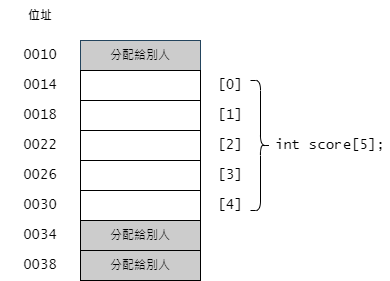
2. 所有元素在記憶體中相鄰緊密排列
3. 可以依索引值快速隨機存取(無需循序)任一內部元素
其中 3 是因為 1, 2 才有辦法做到的。
以下面這個陣列為例:
> score[i];
}
......
```
實際寫下去執行,會發現還真的可以成功,這是為什麼呢?
C 語言的 C99 標準,支援可變長度陣列(VLA, variable-length array)。所以我們可以像上面那樣在執行中宣告一個以變數指定大小的陣列(但是之後就固定那個大小)。
由於我們使用的 C++ 編譯器 gcc 使用 extention 支援了 VLA,所以也可以做到。但是這個並不是 C++ 標準裡的東西,也就是並非所有的 C++ 編譯器會支援,你的程式碼可能在別的環境下會編譯失敗。
## 安全性問題
看一下以下的程式碼,預測他的輸出結果。
```C++
int numberOfStudent = 6;
int score[6];
for(int i=1; i<=6; i++) { // 依序輸入 10 20 30 40 50 60
cin >> score[i];
}
cout << numberOfStudent << endl;
```
使用 Code::Blocks 預設的 32 位元編譯器來編譯執行後,令人意外的,我們在程式裡根本沒有動到 numerOfStudent,但是輸出時卻發現 numerOfStudent 已經由 6 變成 60 了,Why ?
因為程式裡宣告了 `int score[6];`,理應只使用 `score[0]`~`score[5]`,但是我們誤操作為 `score[1]`~`score[6]`。而 `score[6]` 推算出來的位址正好是 numberOfStudent 所在的位置。
編譯器不會提出警告,因為這是合法的操作(雖然在這情境下不合理)。程式設計師要自己負責做這種邊界檢查。
這讓 C++ 的程式變得容易有安全弱點,所以近年來有人提議使用會自己做記憶體管理和邊界檢查的程式語言。但是相對的就要付出一定的性能做為代價。
## 競賽可能遇到的問題
在競賽時為了搶時間求效能,我們常會宣告一個很大的陣列,而不是在那斤斤計較的省記憶體。
下面個程式可以成功編譯,但是執行後就直接 crash,連第一行 cout 都沒執行到。
```C++
#include
using namespace std;
int main()
{
int dat[200000001]; // 宣告在區域(local)
cout << "Input a integer:";
cin >> dat[200000000];
cout << dat[200000000] << endl;
return 0;
}
```
結束時返回的狀態碼是 **Process terminated with status -1073741571** (stack over flow)。在比賽時你可能會得到的訊息是 **segmentation fault**。
如果不要把它宣告在 main 函數內,而是宣告存全域區,讓它成為全域變數則可以成功執行。
```C++
#include
using namespace std;
int dat[200000001]; // 宣告在全域區(global)
int main()
{
cout << "Input a integer:";
cin >> dat[200000000];
cout << dat[200000000] << endl;
return 0;
}
```
差別在哪裡呢?宣告在 local 的話,會用 stack 裡的記憶體來配置給它,而預設的 stack 都不大,可能只有幾 MB。而宣告在 global,則會配置在 data segment 裡,有更大的空間可用。
所以在比賽時,如果沒有變數污染的顧慮,宣告在 global 會比較好。
using namespace std;
int main()
{
char greeting[13] = "Hello world!";
cout << greeting;
return 0;
}
```
using namespace std;
int main()
{
char greeting[13] = "Hello world!";
cout << greeting; // 輸出: "Hello world!"
cin >> greeting; // 輸入: "Good"
cout << greeting; // 輸出: "Good"
return 0;
}
```
在第 11 行輸入 "Good" 之後,greeting 陣列的內容會變成這樣。
`,才能使用 string。但有的編譯器只要你 `#include ` ,就會include string,所以不寫也有可能會過,但寫了一定不會錯)
```C++
#include
#include
using namespace std;
int main()
{
string greeting = "Hello world!";
cout << greeting; // 輸出: "Hello world!"
cin >> greeting; // 輸入: "This_is_a_test_for_a_very_long_string."
// 很安全,不會覆蓋到其他資料
cout << greeting; // 輸出: "This_is_a_test_for_a_very_long_string."
return 0;
}
```
string 不是 int, float, double, char ...這種原生資料型別(Primitive Data Types)。他是用 C++ 寫出的一個類別(class),所以擁有比原生資料型別更多的能力。
### 取得 string 字串長度
使用 string 的 `length()` 方法(method),可以取得 string 內儲存字串的長度。
```C++
string str;
str = "abc";
cout << str.length() << endl; // 3
cin >> str; // 輸入 Memory
cout << str.length() << endl; // 6
```
###### 練習:Reverse output - 反向輸出字串
讀取一個不含空白字元的字串,反向輸出它。
**範例輸入:**
Hello
**範例輸出:**
olleH
---
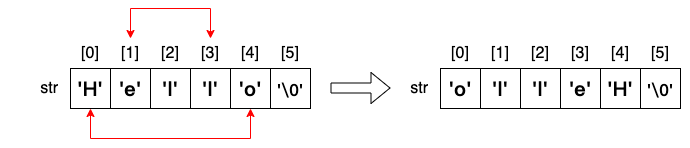
要反向輸出字串,我們需要知道該宇串的長度,才能使用索引值,將它一個一個字元反向輸出。
```C++
#include
#include
using namespace std;
int main()
{
string str;
cin >> str;
for(int i=str.length()-1; i>=0; i--) // 最後一個字元的索引是 str.length()-1
{
cout << str[i];
}
cout << endl;
return 0;
}
```
Hello
olleH
###### 練習:Reverse a string - 反向一個字串
讀取一個不含空白字元的字串,**真的將其內容反向** 後再輸出。
**範例輸入:**
Hello
**範例輸出:**
olleH
---
using namespace std;
int main()
{
string str;
cin >> str;
cout << "Before reverse: [" << str << "]" << endl;
int len = str.length(); // length of str
for(int i=0; i
Hello
Before reverse: [Hello]
After reverse: [olleH]
## 組成字串的字元,在記憶體裡也就是數字而已
組成字串的字元,在記憶體裡也就是數字而已,操作這些數字可以做出一些很有意思的事情。
上網查一下 ASCII,看看每個英文字元對應的編碼數值為何。
https://zh.wikipedia.org/zh-tw/ASCII
仔細觀察一下,大寫字母的字碼加上 32 就是小寫字母的字碼。
A|B|C|D|E|F|...|W|X|Y|Z|
-|-|-|-|-|-|-|-|-|-|-|
65|66|67|68|69|70|...|87|88|89|90|
a|b|c|d|e|f|...|w|x|y|z|
-|-|-|-|-|-|-|-|-|-|-|
97|98|99|100|101|102|...|119|120|121|122|
### 大小寫轉換
###### 練習:to lower - 把英文單字轉換成全部小寫
讀取一個不含空白字元的字串,將其中的大寫字母都改成小寫。
**範例輸入:**
YouTube
**範例輸出:**
youtube
---
```C++
#include
using namespace std;
int main()
{
string str;
cin >> str;
cout << "Before: [" << str << "]" << endl;
int len = str.length(); // length of str
for(int i=0; i='A' && str[i]<='Z') // 這樣比大小是可以的,因為每個字元都是數字
{
str[i] = str[i]+32;
}
}
cout << "After: [" << str << "]" << endl;
return 0;
}
```
YouTube
Before reverse: [YouTube]
After reverse: [youtube]
大家可以自己試試看
* 全部轉大寫
* 大寫小寫互換
### char <--> int
既然字串裡的字元,其實都是以數值方式儲存在記憶體中。如果我們想把字串 "abcdefg" 的字碼像這樣依序列出。
97 98 99 100 101 102 103
是不是這樣就可以了?
```C++
string str = "abcdefg";
for(int i=0; i
a b c d e f g
因為 cin 判別 str[i] 是一個字元(char),所以會把它以字元方式輸出。
必須讓 cin 把它視為 int 才能順利輸出數值。
我們可以使用 `int( )` 強制將 char 轉型為 int。
```C++
string str = "abcdefg";
for(int i=0; i
97 98 99 100 101 102 103
反過來也可以用 `char( )` 把 int 強制轉型為 char。要注意的是 char 的大小為 1 Byte,所以只能接受 0~255。
```C++
int data[7] = {97, 98, 99, 100, 101, 102, 103};
for(int i=0; i<7; i++)
{
cout << char(data[i]); // 強制轉型為 char
}
cout << endl;
```
輸出結果如下:
abcdefg
## 讀取一整行
在之前的例子中,我們無法輸入 "This is a test." 這樣的句子。因為 cin 在讀取 "This" 之後遇到空白字元,就中斷讀取。也就是一次只能讀進一個單字。
我們試一下這個程式
```C++
#include
using namespace std;
int main()
{
string line;
int i = 1;
while(cin >> line)
{
cout << i << ": " << line << endl;
i++;
}
return 0;
}
```
輸入以下兩行字串
Hello world!
This is a test.
我們得到的輸出會是
1: Hello
2: world!
3: This
4: is
5: a
6: test.
### 使用 getline 讀取一行
使用 `getline()` 函數可以讀入一整行的字串,也就是讀到換行為止。
```C++
#include
using namespace std;
int main()
{
string line;
int i = 1;
while(getline(cin, line))
{
cout << i << ": " << line << endl;
i++;
}
return 0;
}
```
同樣的輸入,這次的輸出為
1: Hello world!
2: This is a test.
### cin 和 getline 搭配使用會遇到的問題
如果題目的輸入是這樣,第一行是 3 表示接下來有 3 行字串。
3
Hello, world.
This is a test.
Good morning
使用以下的程式讀取後,依序輸出各行字串。
```C++
#include
using namespace std;
int main()
{
string line;
int n;
cin >> n;
for(int i=0; i
Hello, world.
This is a test.
Good morning
實際得到的是
Hello, world.
This is a test.
前面多一行空白行,後面少一行 "Good morning"
原因如下:
* 我們的輸入包含按下的[Enter]是長這個樣子
3`\n`Hello, world.`\n`This is a test.`\n`Good morning`\n`
* 第 10 行的 cin >> n; 會把 3 讀進 n,於是剩下
`\n`Hello, world.`\n`This is a test.`\n`Good morning`\n`
* 接下來第 14 行的 getline(cin, line); 會把一行字串讀入 line 中,但是因為一開始就遇到換行,於是 line 裡面是個空字串 ""。但迴圈已繞了一圈,現在剩下的是
Hello, world.`\n`This is a test.`\n`Good morning`\n`
* 所以接下來第二圈的 getline 讀完一行後,剩下
This is a test.`\n`Good morning`\n`
* 最後一圈的 getline 讀完一行後,還剩下
Good morning`\n` 沒被讀取,也沒被印出。
解決的方式是,用 cin 讀完 3 這個整數後,想辦法把後面的換行字元 '\n' 也先讀取掉。
```C++
#include
using namespace std;
int main()
{
string line;
int n;
cin >> n >> ws; // 注意這裡的 ws
for(int i=0; i請注意,在這裡的 ws 指的是 white space,意思就是把 空白/換行/tab 這些「空白」字元都先讀光光。
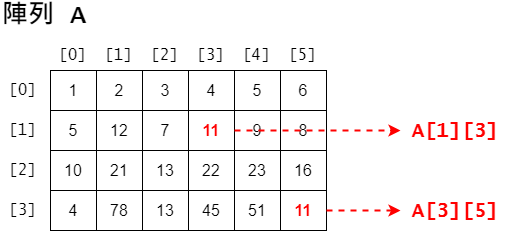
1 2 3 4 5 6
5 12 7 11 9 8
10 21 13 22 23 16
4 78 13 45 51 11
###### 練習:2D 地圖
給定一張 m x n 大小的地圖,以及各地貌的代表數字,請輸出該地圖。
$ 1 \le m, n \le 100 $
**輸入說明:**
第一行是兩個正整數 m n,表示陣列的 列數(row)、行數(column)。
接下來是共 m 列,每列有 n 個整數的地圖資訊,表示該位置的地貌代碼。
接著是一個整數 k,表示有 k 種地貌。
最後是 k 列,每列為一個整數 i 與一個字元 c,表示代碼 i 的地貌為 c。
**輸出說明:**
輸出該地圖的地貌,如範例輸出。
**範例輸入:**
3 4
1 1 1 1
2 2 0 1
1 2 0 1
3
0 _
1 #
2 *
**範例輸出:**
####
**_#
#*_#
---
```C++
#include
using namespace std;
int main()
{
int m, n;
cin >> m >> n;
int M[100][100]; // 這樣比較安全,若 size 太大可考慮宣告在全域區
// int M[m][n]; // C99 的 VLA 允許這麼宣告,但是若 size 太大會有問題
for(int i=0; i> M[i][j];
}
}
int k;
cin >> k;
int N[k]; // 地貌代碼
char T[k]; // 地貌
for(int i=0; i> N[i] >> T[i];
}
for(int i=0; i 


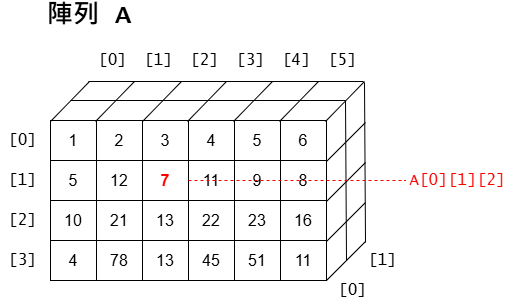 平常我們很少使用超過 3 維的陣列,除非你很確定自己需要,否則在你宣告一個大於 3 維的陣列之前,可以想一想,有沒有更好的方式可以不要用到這麼高維的陣列。